The Presentation Definition is used in the PowerPoint Generator. It defines which diagram templates the presentation styling applies to, where the diagram data comes from, the optional master slide styling, and the optional AI description settings.

Short description: (Optional) Fill in Short description with a short internal note on what this Presentation Definition is for.
Relevant for template: the template(s) this Presentation Definition applies to (for example, BusinessProcessDiagram). This determines which diagram types the styling and AI settings are offered for.
Data Source: GenericQuery that is suitable for the diagram template entered in Relevant for template. This query supplies the data the presentation is built from.
Master slide file: (Optional) Fill in a Master slide file with an ExternalDocument that contains a PowerPoint file with a master slide. Only slide 1 of this PowerPoint file is used for the presentation’s visual styling — any other slides in the file are ignored.
AI settings (optional)
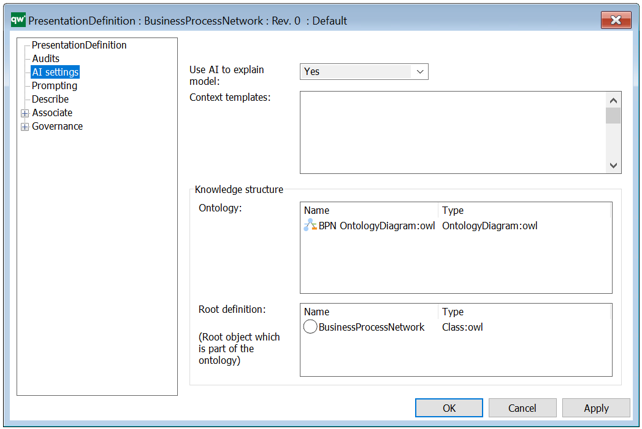
Complete this section only if diagrams generated from this Presentation Definition should be able to include AI-written descriptions.
Use AI to explain model: Yes/No
Context templates:
Knowledge structure: choose or create an OntologyDiagram that defines which object and symbol attributes are allowed to be sent to the AI. Only attributes covered by this ontology are available to the AI when it writes a description.
Root definition: Set Root definition to the root object of the ontology selected in the previous step (for example, BusinessProcessDiagram).
Configure Prompting (Required for AI)

Complete this section together with AI settings if you want to control how the AI writes its descriptions.
Additional knowledge characteristics: Fill in an explanation, in plain text, of how you want the AI to write the information — for example the tone, audience, and format (such as instructing it to write in bullet points for a management audience).
Set Randomness (Temperature) to a value between 0 (predictable, repeatable wording) and 1 (more varied wording).
Publish the Presentation Definition
You need to publish the HTMLPublisher on the PresentationDefinition object. Publishing makes the Presentation Definition available for selection as a styling template by web users.