The Evaluation template is used for evaluating the effectiveness of a Control Activity.
In it, you can document findings in the form of Non-Conformances, Control Deficiencies and Change Requests. You can link to involved parties in the form of Organization Units, Persons and Business Connections, and link to the Responsible in the form of a Person. The conclusion results in the control activity be found either effective or ineffective. Clarifying concluding comments can be added.
The Financial Statement object is used to describe the upper level in a company’s accounts. It can be described using its Short Description field and you can link to Accounts and other financial statements in its “Top Accounts” field.
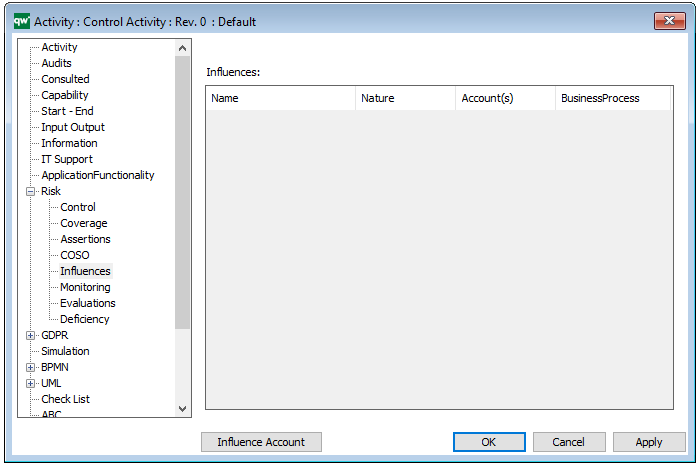
The Financial Statement can be linked to objects as an Influence under their Risk tab:
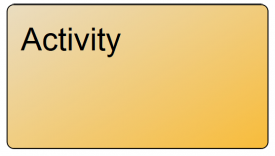
An activity is a work process that is carried out by the organization. Activities can be defined at a high abstraction level where they constitute business guidelines or top-level business structures. Activities can also be working procedures or even work instructions at a low level of abstraction. Using ‘BreaksDownTo’ functionality a total description of the workstructure of an organization can be created, starting from the strategic level, going down through the tactical level to the operational level.
Activies appear among other in WorkFlowDiagrams and BusinessProcessDiagram. In this case the activities are part of a documented workprocess, where different parts of the organization plays different Role.
A BusinessDiagram or a BusinessProcessNetwork will often show the structure of the work, whereas a WorkFlowDiagram will show the flow of the work – sequence of activities, conditions etc., like a flowchart. When activites are used on a WorkFlowDiagram the purpose will often be to simulate the described business process in order to improve it. Therefore, activity information like duration, cost, iteration and uncertainties are essential.
Control Activities
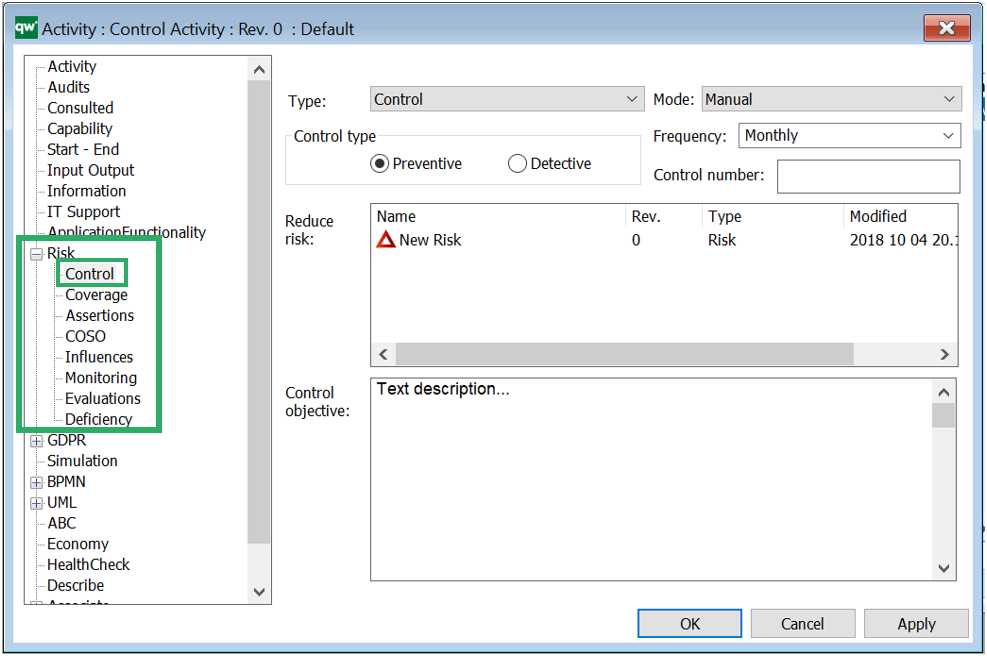
The Activity can, under its risk tab, be defined as a Control or a Key Control. Here, you can also add information about Control type, mode, frequency and monitoring:
The control type of the activity can be set as either preventive (minimize the likelihood of a given risk occurring), or detective (minimize the impact when the risk occurs). A Control Activity is typically created from the Risk template (under its control tab in its properties) as a backwards relation.
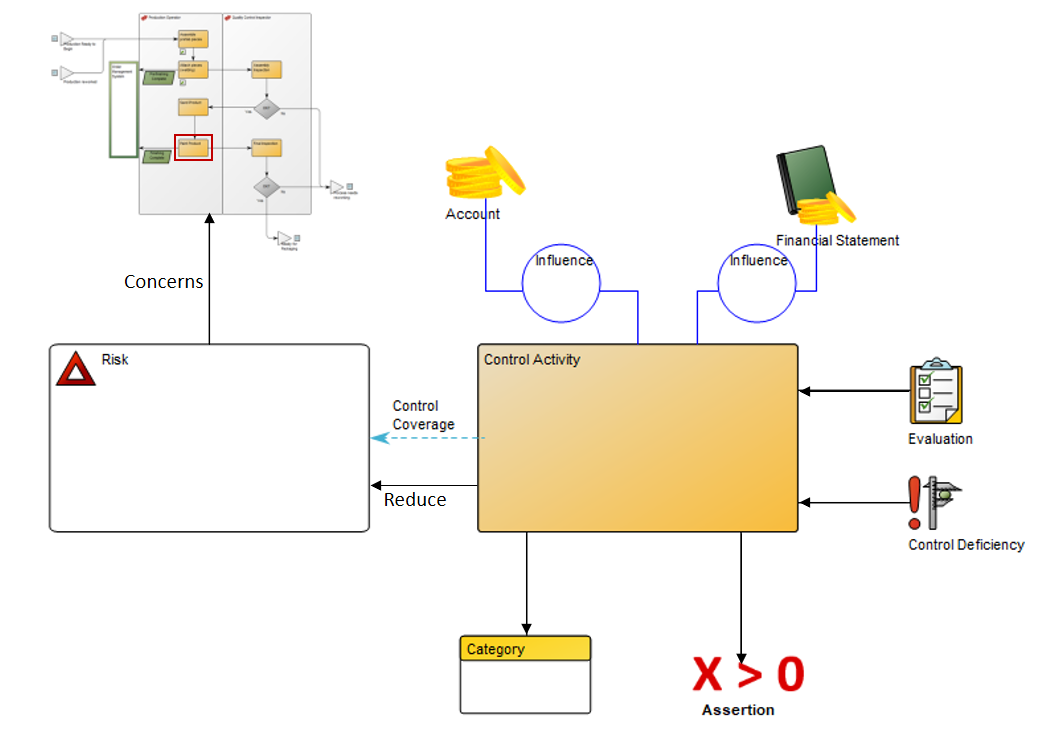
The Control Activity may be enriched by linking Control Coverage, Influences (that may consist of Accounts or Financial Statements) Evaluations, Control Deficiencies, Assertions and COSO Categories to it. Below, you can see how the Control Activity relates to the Risk and other relevant templates:
Arrows that point away from the Control Activity are items the Activity link to. Arrows that point towards the Control Activity illustrate that it is the objects that link to the activity. The Control Activity should be inserted into the Workflow Diagram or Business Process Diagram where it belongs. This could be in the workflow where the risk occurs or it could be in a separat Workflow Diagram.
Purpose: The purpose of the Heat Map template is to document a representation of values from other QualiWare templates in the form of a Heat Map.
Core concerns: The Heat Map template is created using the Risk Management and Application Portfolio Management toolbars in a diagrams action tab in QLM. It can afterwards be found under the Heat Map template in the repository explorer window.
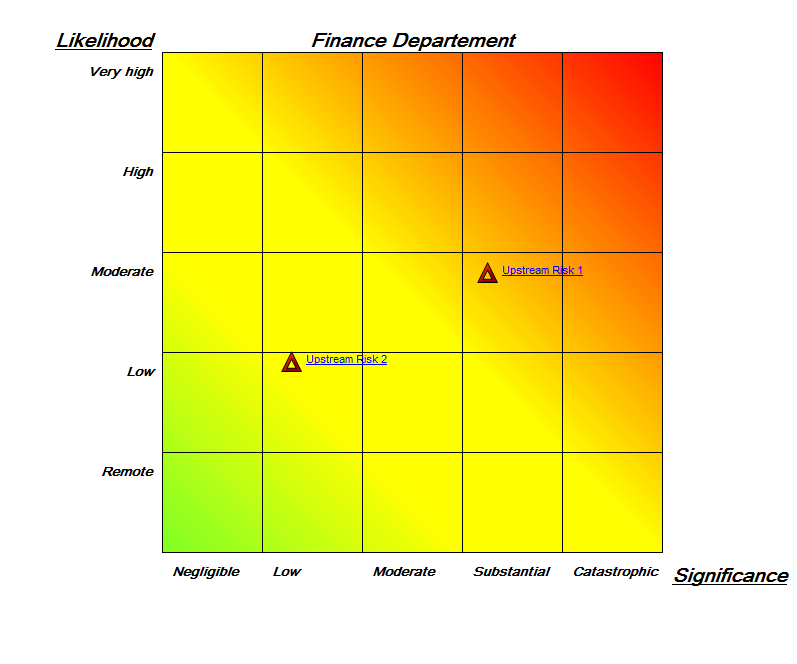
The Heat Map template can, for example be used to document risks, identify the most pressing ones. Additionally, Heat Maps can be used to identify systems that don’t live up to business or technical criteria.
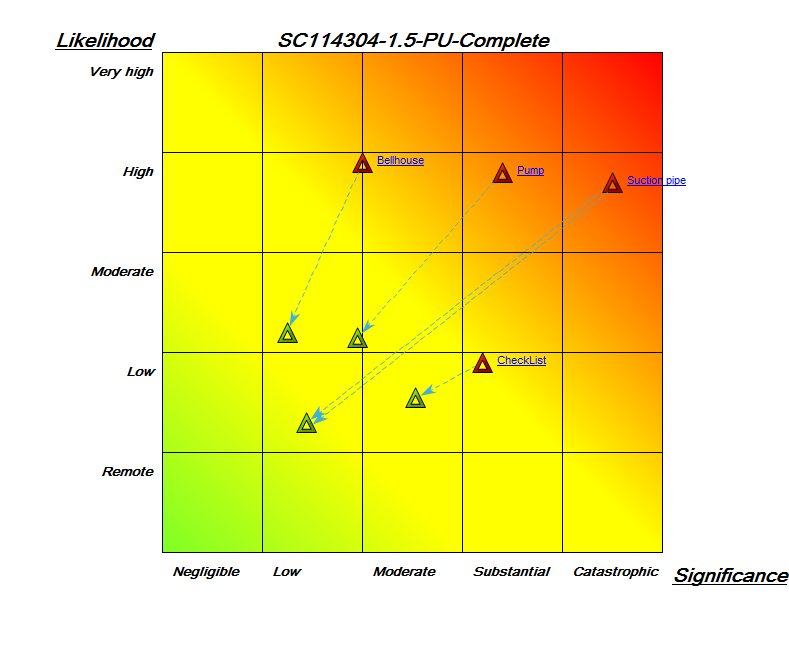
Below, you can see two examples of Heat Maps for risks. The first shows two risks and how they compare to each other with regards to significance and likelihood:
The second Heat Map shows four risks as well as their residual risks, and how they compare to each other regarding likelihood and significance:
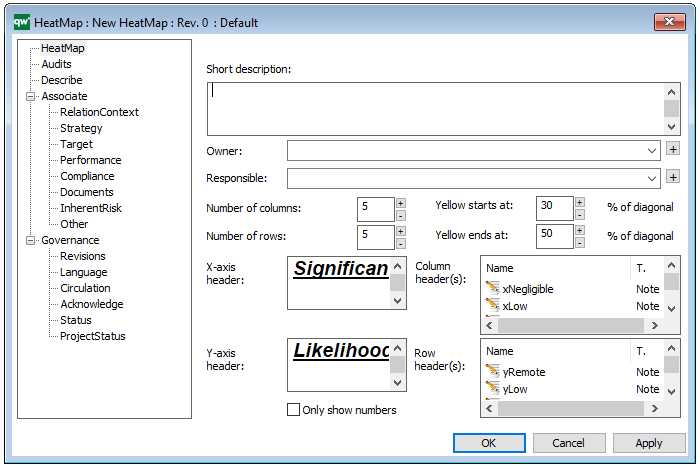
Properties and metadata: The Heat Map template can for example retain the following information:
A description of the diagram
Link to the owner
Link to the responsible
Audits (auto generated information regarding its current state and access rights)
Associated documents, diagrams and other objects
Inherent Risk detailing risk considerations
Governance information detailing information about the published diagram and who has been involved in the approval of the model
The above picture shows the properties dialogue window for the Heat Map template, where you can view and edit the template’s properties in QualiWare Lifecycle Manager.
To learn how to build Heat Maps in QualiWare click here
Purpose: The purpose of the Account Context Diagram is to enable financial risk management by illustrating which processes create transactions on a given account, and which risks are related to this transaction.
Core concerns: The Account Context Diagram enables you to model Accounts, Business Processes and link them with influences.
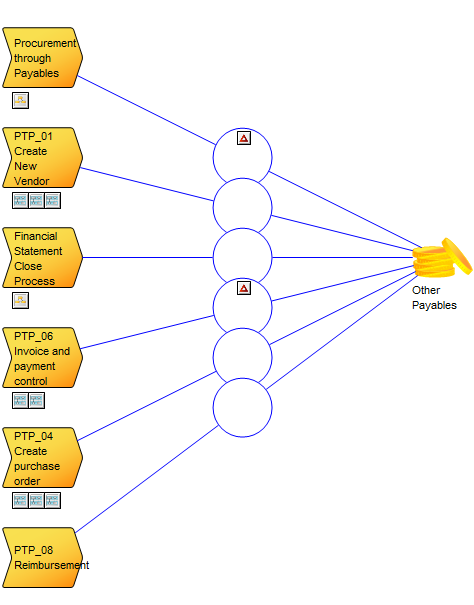
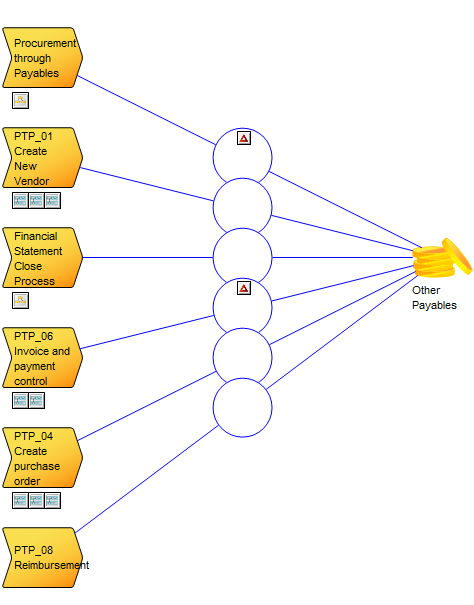
Below, you can see an example of an Account Context Diagram for the account ‘Other Payables’:
The risks are linked to the influencers and shown on the diagram. For example, in the above diagram, both risks are: ‘Goods received not invoiced, not recognized as a liability at period end’.
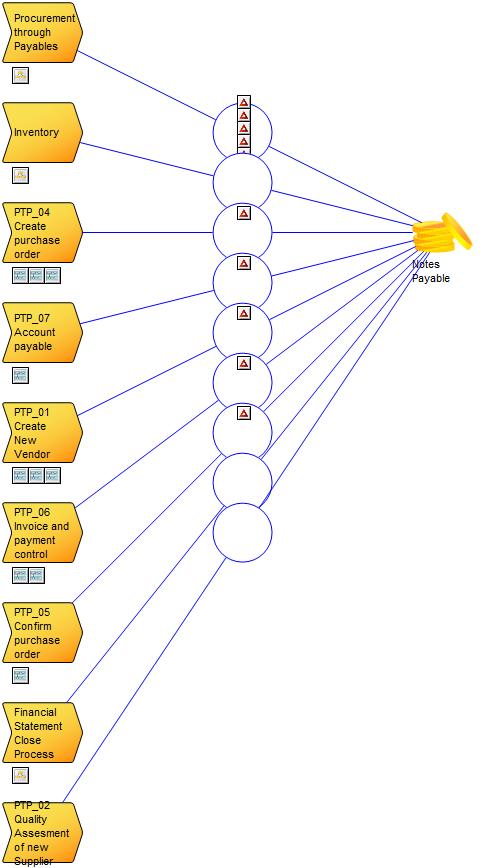
It is possible to link multiple risks to each influence. In the following diagram, you can see a similar Account Context Diagram, where several risks are connected to a single influence:
Relation to other templates: The Account Context diagram is for financial risk management. It is related to the Control Coverage Map and the Heat Map templates, which can be generated based on the information in the Account Context Diagram.
Properties and metadata: The Account Context Diagram can for example retain the following information:
A description of the diagram
Link to the owner of the diagram
Link to the one responsible for the diagram
Link to the Account shown in the diagram
Audits (auto generated information regarding its current state and access rights)
Associated documents, diagrams and other objects
Inherent Risk detailing risk considerations
Governance information detailing information about the published diagram and who has been involved in the approval of the diagram
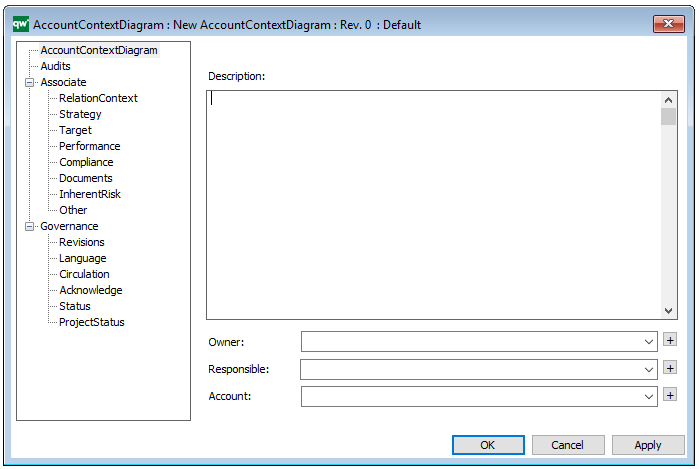
The above picture shows the properties dialogue window for the Account Context Diagram where you can view and edit the diagram’s properties in QualiWare Lifecycle Manager.
This chapter describes risk management, which is a technique used to mitigate risk when implementing an architecture project.
31.1 Introduction
There will always be risk with any architecture/business transformation effort. It is important to identify, classify, and mitigate these risks before starting so that they can be tracked throughout the transformation effort.
Mitigation is an ongoing effort and often the risk triggers may be outside the scope of the transformation planners (e.g., merger, acquisition) so planners must monitor the transformation context constantly.
It is also important to note that the enterprise architect may identify the risks and mitigate certain ones, but it is within the governance framework that risks have to be first accepted and then managed.
There are two levels of risk that should be considered, namely:
Initial Level of Risk: Risk categorization prior to determining and implementing mitigating actions.
Residual Level of Risk: Risk categorization after implementation of mitigating actions (if any).
The process for risk management is described in the following sections and consists of the following activities:
Risk classification
Risk identification
Initial risk assessment
Risk mitigation and residual risk assessment
Risk monitoring
31.2 Risk Classification
Risk is pervasive in any enterprise architecture activity and is present in all phases within the Architecture Development Method (ADM). From a management perspective, it is useful to classify the risks so that the mitigation of the risks can be executed as expeditiously as possible.
One common way for risks to be classified is with respect to impact on the organization (as discussed in 31.4 Initial Risk Assessment), whereby risks with certain impacts have to be addressed by certain levels of governance.
Risks are normally classified as time (schedule), cost (budget), and scope but they could also include client transformation relationship risks, contractual risks, technological risks, scope and complexity risks, environmental (corporate) risks, personnel risks, and client acceptance risks.
Another way of delegating risk management is to further classify risks by architecture domains. Classifying risks as business, information, applications, and technology is useful but there may be organizationally-specific ways of expressing risk that the corporate enterprise architecture directorate should adopt or extend rather than modify.
Ultimately, enterprise architecture risks are corporate risks and should be classified and as appropriate managed in the same or extended way.
31.3 Risk Identification
The maturity and transformation readiness assessments will generate a great many risks. Identify the risks and then determine the strategy to address them throughout the transformation.
The use of Capability Maturity Models (CMMs) is suitable for specific factors associated with architecture delivery to first identify baseline and target states and then identify the actions required to move to the target state. The implications of not achieving the target state can result in the discovery of risks. Refer to 30. Business Transformation Readiness Assessment for specific details.
Risk documentation is completed in the context of a Risk Management Plan, for which templates exist in standard project management methodologies (e.g., Project Management Book of Knowledge and PRINCE2) as well as with the various government methodologies.
Normally these methodologies involve procedures for contingency planning, tracking and evaluating levels of risk; reacting to changing risk level factors, as well as processes for documenting, reporting, and communicating risks to stakeholders.
31.4 Initial Risk Assessment
The next step is to classify risks with respect to effect and frequency in accordance with scales used within the organization. Combine effect and frequency to come up with a preliminary risk assessment.
There are no hard and fast rules with respect to measuring effect and frequency. The following guidelines are based upon existing risk management best practices. Effect could be assessed using the following example criteria:
Catastrophic infers critical financial loss that could result in bankruptcy of the organization.
Critical infers serious financial loss in more than one line of business leading to a loss in productivity and no return on investment on the IT investment.
Marginal infers a minor financial loss in a line of business and a reduced return on investment on the IT investment.
Negligible infers a minimal impact on a line of business’ ability to deliver services and/or products.
Frequency could be indicated as follows:
Frequent: Likely to occur very often and/or continuously.
Likely: Occurs several times over the course of a transformation cycle.
Occasional: Occurs sporadically.
Seldom: Remotely possible and would probably occur not more than once in the course of a transformation cycle.
Unlikely: Will probably not occur during the course of a transformation cycle.
Combining the two factors to infer impact would be conducted using a heuristically-based but consistent classification scheme for the risks. A potential scheme to assess corporate impact could be as follows:
Extremely High Risk (E): The transformation effort will most likely fail with severe consequences.
High Risk (H): Significant failure of parts of the transformation effort resulting in certain goals not being achieved.
Moderate Risk (M): Noticeable failure of parts of the transformation effort threatening the success of certain goals.
Low Risk (L): Certain goals will not be wholly successful.
These impacts can be derived using a classification scheme, as shown in Figure 31-1.
Figure 31-1: Risk Classification Scheme
31.5 Risk Mitigation and Residual Risk Assessment
Risk mitigation refers to the identification, planning, and conduct of actions that will reduce the risk to an acceptable level.
The mitigation effort could be a simple monitoring and/or acceptance of the risk to a full-blown contingency plan calling for complete redundancy in a Business Continuity Plan (with all of the associated scope, cost, and time implications).
Due to the implications of this risk assessment, it has to be conducted in a pragmatic but systematic manner. With priority going to frequent high impact risks, each risk has to be mitigated in turn.
31.6 Conduct Residual Risk Assessment
Once the mitigation effort has been identified for each one of the risks, re-assess the effect and frequency and then recalculate the impacts and see whether the mitigation effort has really made an acceptable difference. The mitigation efforts will often be resource-intensive and a major outlay for little or no residual risk should be challenged.
Once the initial risk is mitigated, then the risk that remains is called the “residual risk”. The key consideration is that the mitigating effort actually reduces the corporate impact and does not just move the risk to another similarly high quadrant. For example, changing the risk from frequent/catastrophic to frequent/critical still delivers an Extremely high risk. If this occurs, then the mitigation effort has to be re-considered.
The final deliverable should be a transformation risk assessment that could be structured as a worksheet, as shown in Figure 31-2.
Figure 31-2: Sample Risk Identification and Mitigation Assessment Worksheet
31.7 Risk Monitoring and Governance (Phase G)
The residual risks have to be approved by the IT governance framework and potentially in corporate governance where business acceptance of the residual risks is required.
Once the residual risks have been accepted, then the execution of the mitigating actions has to be carefully monitored to ensure that the enterprise is dealing with residual rather than initial risk.
The risk identification and mitigation assessment worksheets are maintained as governance artifacts and are kept up-to-date in Phase G (Implementation Governance) where risk monitoring is conducted.
Implementation governance can identify critical risks that are not being mitigated and might require another full or partial ADM cycle.
31.8 Summary
Risk Management is an integral part of enterprise architecture. Practitioners are encouraged to use their corporate risk management methodology or extend it using the guidance in this chapter. In the absence of a formal corporate methodology, architects can use the guidance in this chapter as a best practice.