This page introduces how to work with compliance matrices in QualiWare. The description is based upon a standard QualiWare 10.10 Diagram Dashboard for RegulationDiagrams.
The page goes through how to create a regulations diagram with regulations, enrich the regulations with complying objects, manage that these complying objects have been audited, and monitor if there are any findings (change request or non-conformances) related to the complying objects.
Create RegulationDiagram with relevant Regulations
This first step to establish compliance is to create/import the relevant regulations into QualiWare. This is done by creating one of more RegulationDiagrams with relevant regulations.
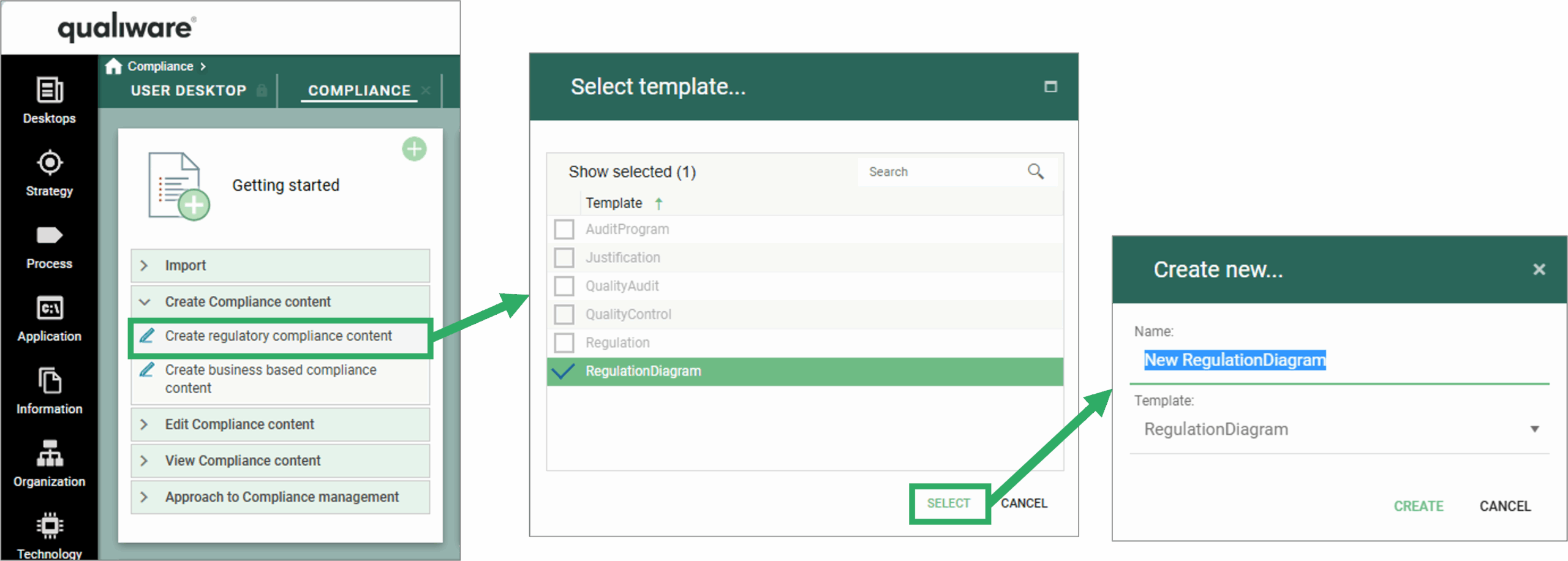
From the Compliance Desktop this can be easily done through the getting started tile.
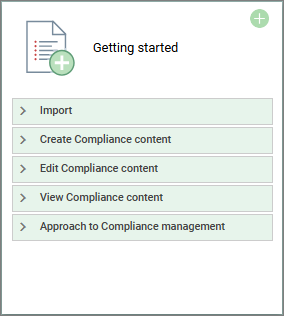
From the Gettings started tile, you can import a set of regulations from a csv-file using the smart importer.
From the Create Compliance Content you can create different types of compliance related objects including individual regulation(s) and regulation diagrams.
The diagram enables you to collect a set of regulations, which is the foundation for a compliance matrix. The RegulationDiagram can be modelled in the Web-Modeler.
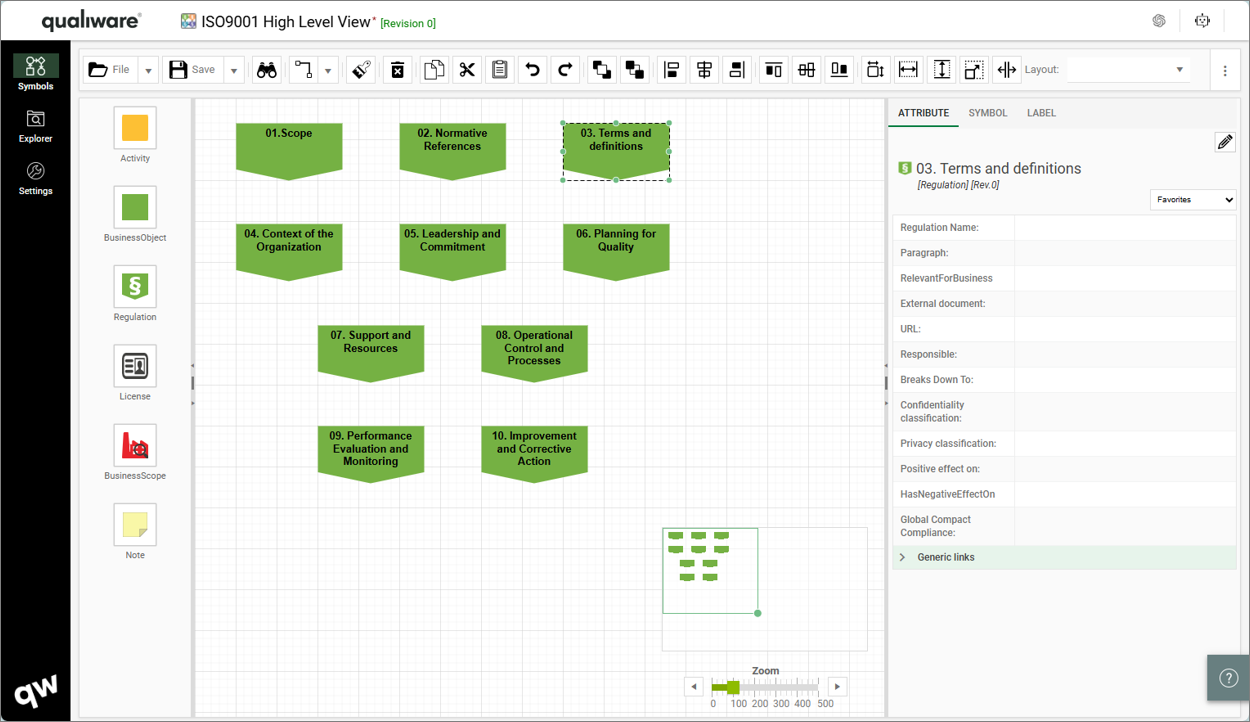
In the Web-Modeler you can model the relevant regulation(s) in the RegulationDiagram to get a relevant scope of e.g. an ISO standard or other type of regulation.
In the webmodeler, you can use the various accelerators to create the diagram, such as QualiAI, or Text-To-Model (click links to learn more about the features).
Enrich Regulations with details, map relevance, and associate complying objects.
Once the Regulations are created/collected in a RegulationDiagram, it is time to enrich the relevant details for each of the regulations.
This can easily done from the edit tile on the standard “Analyzing and Improving” Dashboard for the RegulationDiagram (learn more about Diagram Dashboards here).
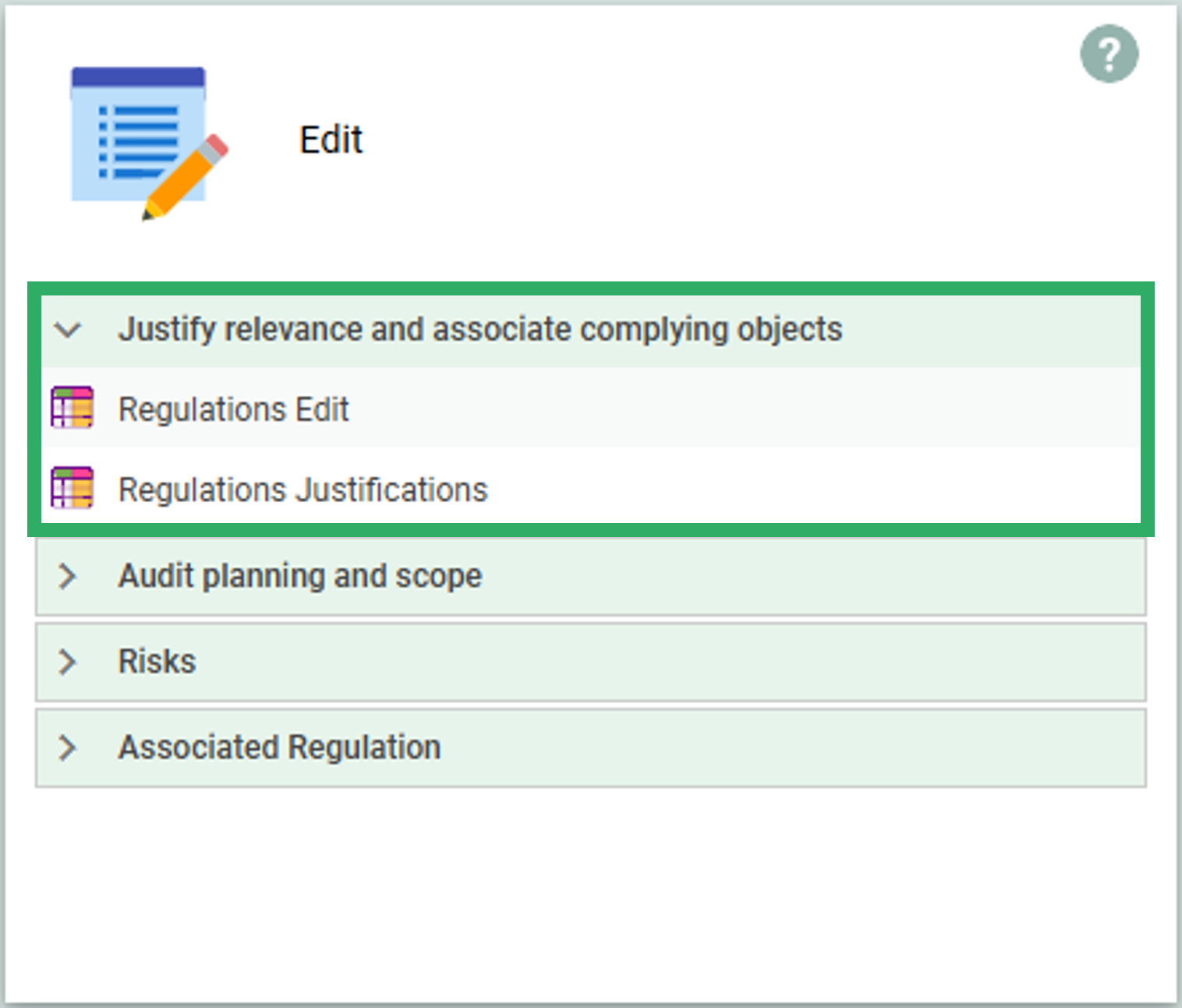
From the Edit tile on the RegulationDiagram – Analyzing and Improving Dashboard you have access to two spreadsheets under “Justify relevance and associate complying objects:
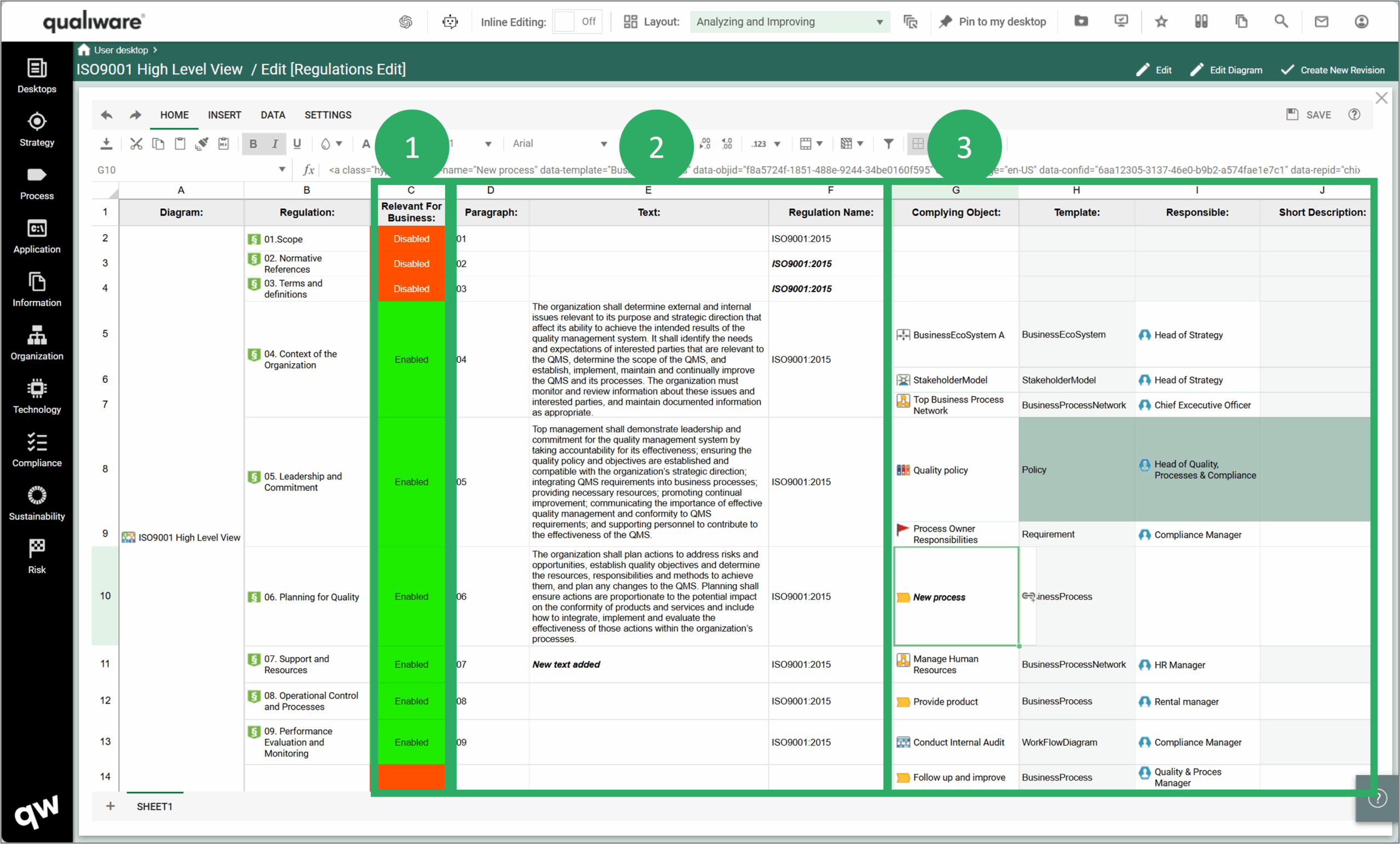
Regulations Edit (Spreadsheet)
This Spreadsheet lists all regulations (column B) in the RegulationDiagram (column A), and from here it is possible to:
-
- Mark whether a regulation is relevant – or not relevant for the business. Relevant regulations are in scope for the compliance activities, i.e. these are the ones you aim to document compliance for,
- Add paragraph (number), paragraph text, and regulation name for each regulation.
- See/create link to complying object(s) mapped to each regulation, and for each complying object you can see/update:
- Template (this is derived from the complying object and cannot be changed. To change you must map a relevant object in Column G)
- See/Change Responsible for the Complying object (or Add if missing)
- See/Change Short description associated to the Complying object
Regulations Justifications (Spreadsheet)
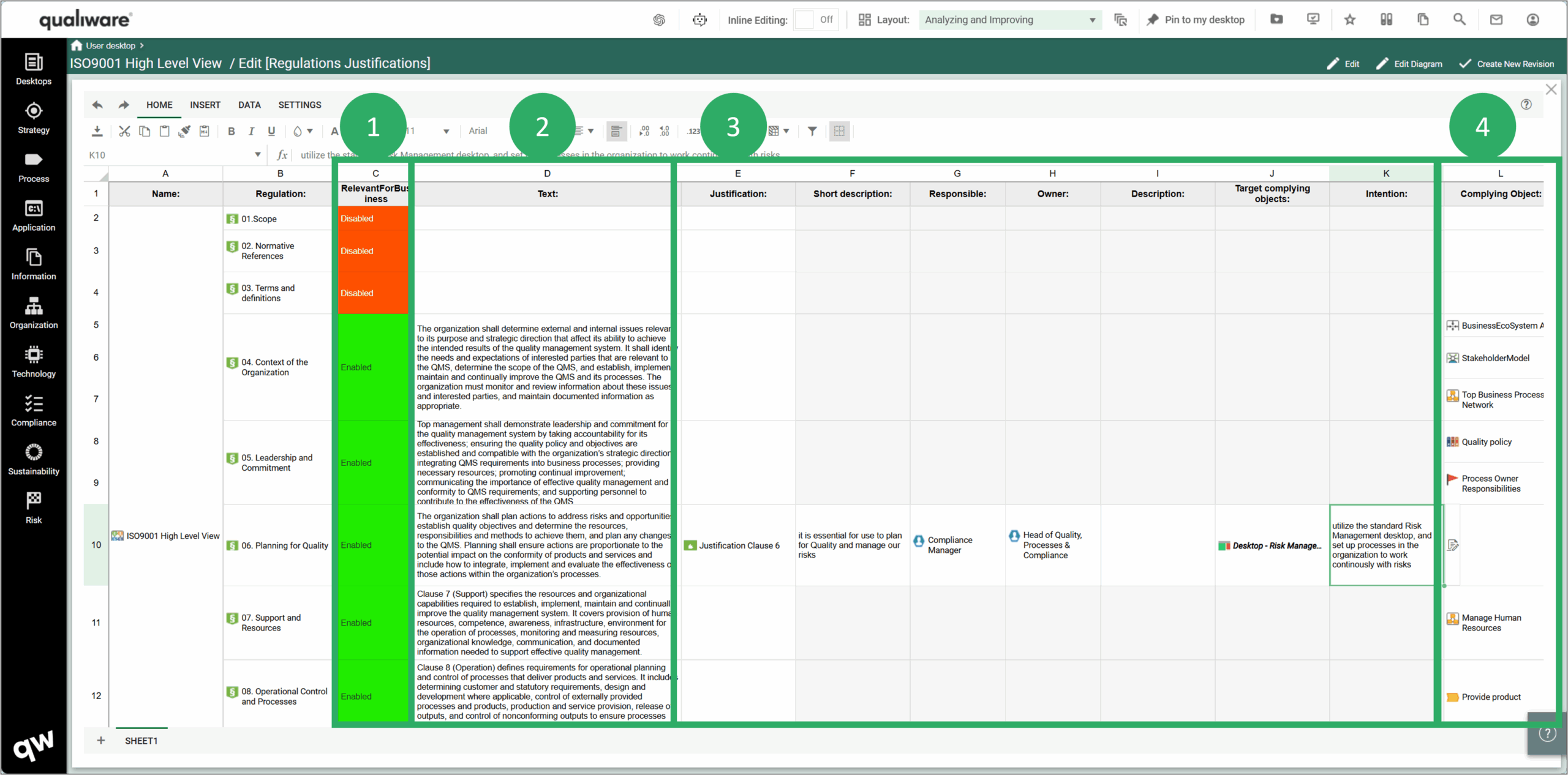
This Spreadsheet lists all regulations (column B) in the RegulationDiagram (column A), and from here it is possible to:
-
- Mark whether a regulation is relevant – or not relevant for the business. Relevant regulations are in scope for the compliance activities, i.e. these are the ones you aim to document compliance for,
- See/update paragraph text for each regulation.
- See/create link to a justification related to the regulation, this can be used to elaborate (and document) justification for why a regulation is relevant (or not), and if relevant describe the intention and map target complying object
- See/create link to complying object(s) mapped to each regulation, and for each complying object you can see/update:
- Template (this is derived from the complying object and cannot be changed. To change you must map a relevant object in Column L)
- See/Change Responsible for the Complying object (or Add if missing)
- See/Change Short description associated to the Complying object
Compliance Matrices
In the RegulationDiagram Dashboard there is access to a set of standard compliance matrices related to the RegulationDiagram and the regulation objects contained in the diagram.
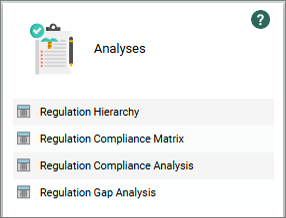
From the Analyses tile, you have access to a set of standard QRVs that can be used to monitor and analyses the status of the regulations complying objects:
Regulations Hierarchy (QRV)
This QueryResultView is useful when you have larger set of regulations, that you choose to model in a 2-level hierarchy, enabling you to focus on relevant parts and keeping the overview of the different levels in a larger structure. If a regulation is comprehensive, it can be beneficial to break it down in two levels, where:
- 1st Level contains the overview with the regulation describing of the different parts, e.g. chapters of a directive, such as GDPR, NIS2 or CSRD, each of these regulations are decomposed into a detailed diagram (2nd level)
- 2nd level contains a regulation diagram for each part with all the relevant sub-paragraphs of the regulation.
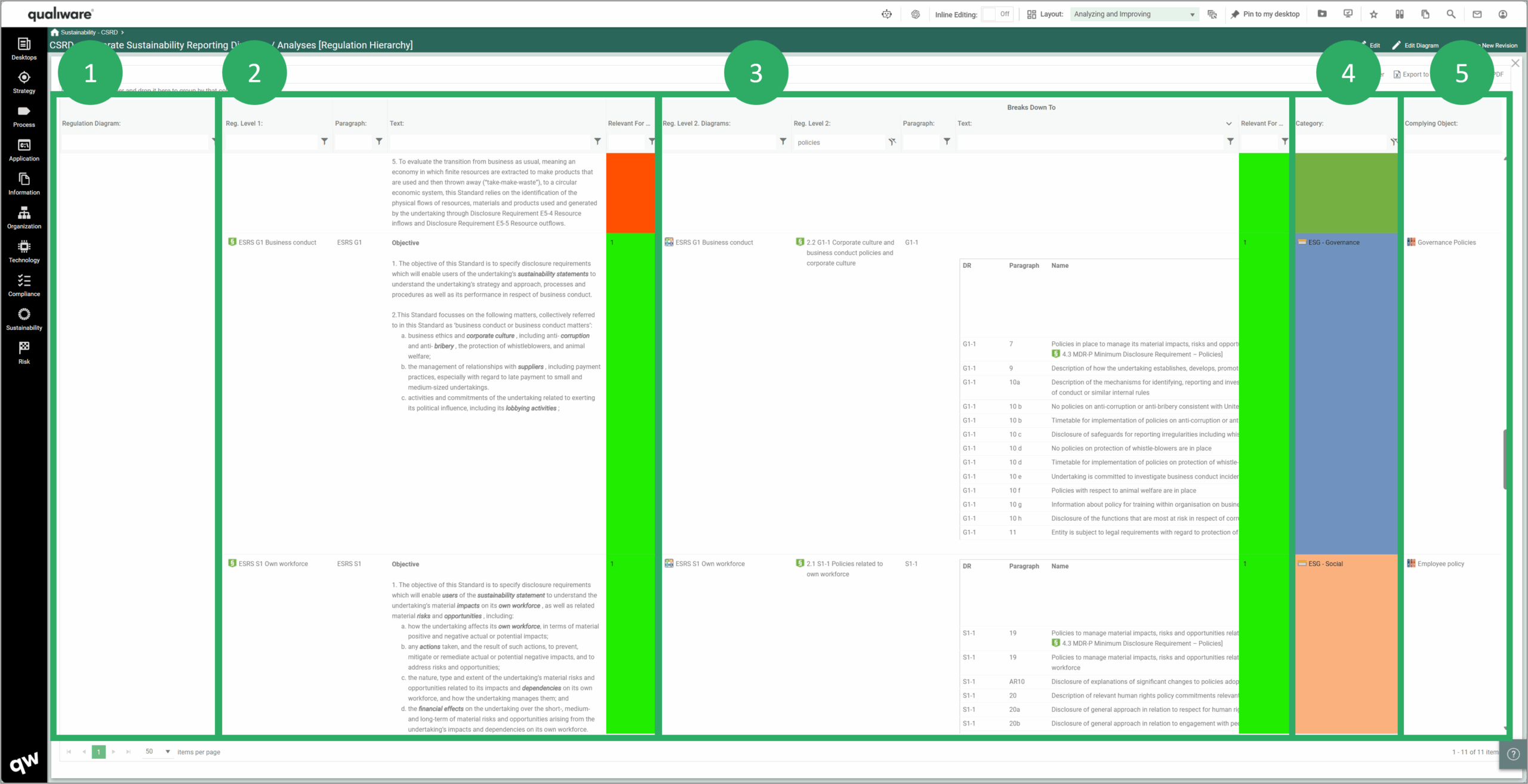
The QRV is structured the following way:
- Contains the 1st Level Regulation Diagram, i.e. the Diagram you are currently viewing in the Dashboard.
- Information about the Level 1 Regulations, i.e. the Regulations contained in the 1st level Regulation Diagram
- Information about 2nd Level Diagram and Level 2 Regulations, i.e. if a Level 1 Regulation is linked (Breaks Down To) to a separate diagram, it is listed along with the regulations in that diagram
- Shows Category asscociated to the Level 2 Regulation object, this can be used to categorize the regulations (and collarcode)
- List Complying objects linked to the Level 2 Regulations.
Comprehensive regulations (e.g. from EU) can benefit from being modeled in 2 levels, these can be comprehensive and often only a subset of a regulation is relevant on a business level (while other parts addresses regulation relevant on a national or international level). But of course, this can also be applied to other types of standards as well.
Regulations Compliance Matrix (QRV)
This QueryResultView – like the Regulation Edit – lists:
- Regulations contained in the diagram, Relevant for business, and paragraph text for each regulation
- Complying object(s) linked to each regulation, as well as information about what Template type the complying object is and the responsible for each complying object.
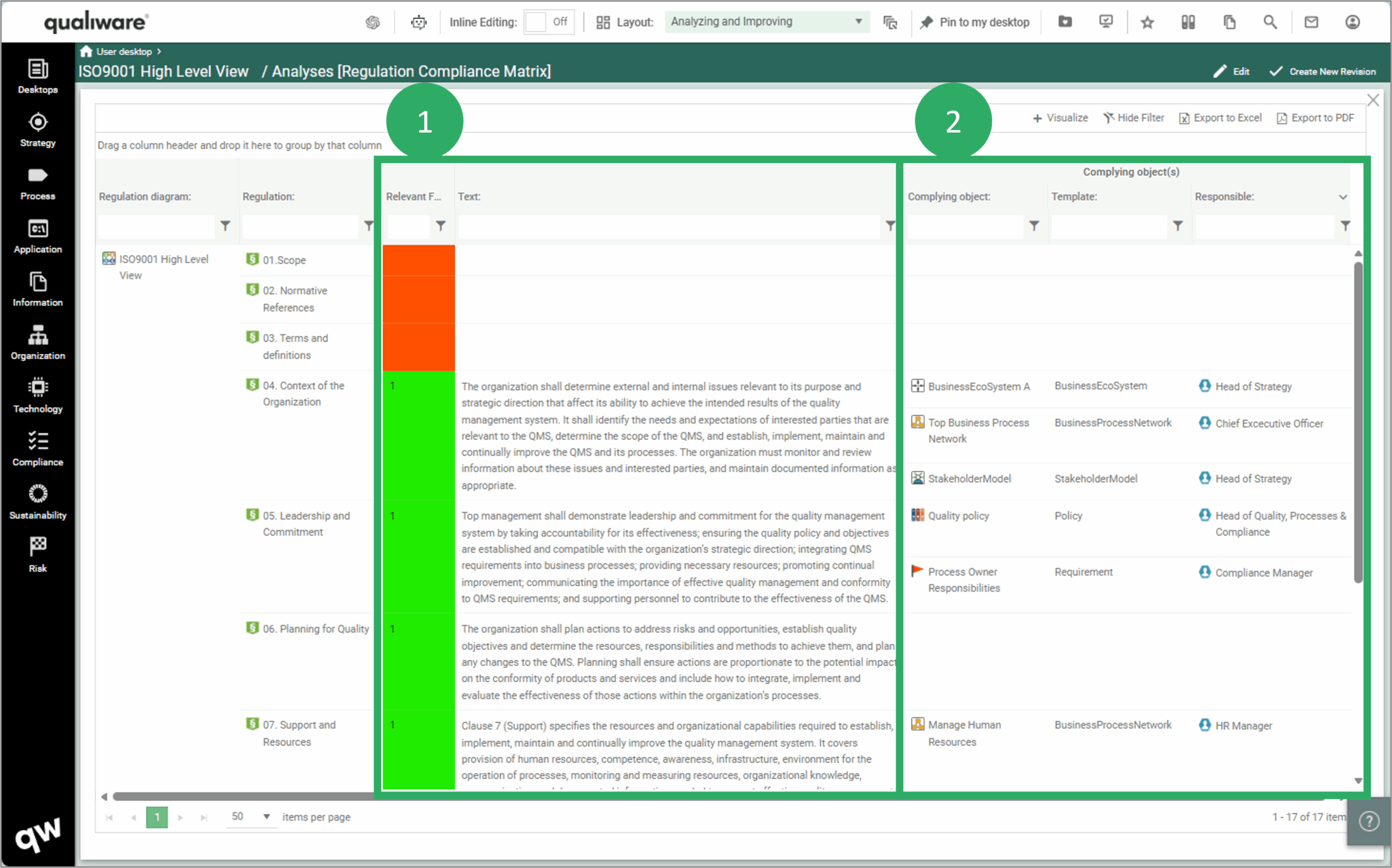
This QueryResultView can be used to search the regulation text, and get an overview of:
- what complying objects that are linked to each regulation, and
- who is responsible for each complying object
It is easy to filter the list and search in the regulation text to find relevant parts, and from a compliance completeness point of view, you can check:
- that all relevant regulations have relevant complying objects associated (and if not, a gap is identified).
- that all complying objects have a responsible allocated (and if not, a gap is identified).
Regulation Compliance Analysis (QRV)
This QueryResultView takes a step further in the analysis of compliance fulfillment. Again, with the outset in the regulations in the diagrams the query shows:
- Regulations contained in the diagram, Relevant for business, and paragraph text for each regulation
- Complying object(s) linked to each regulation, as well as information about what Template type the complying object is, the short description of the object and the responsible and owner for each complying object.
- All associated Audits where the complying object is target process(object) along with details about the audit (Audit type, Audit Date) and the Governance State of the audit.
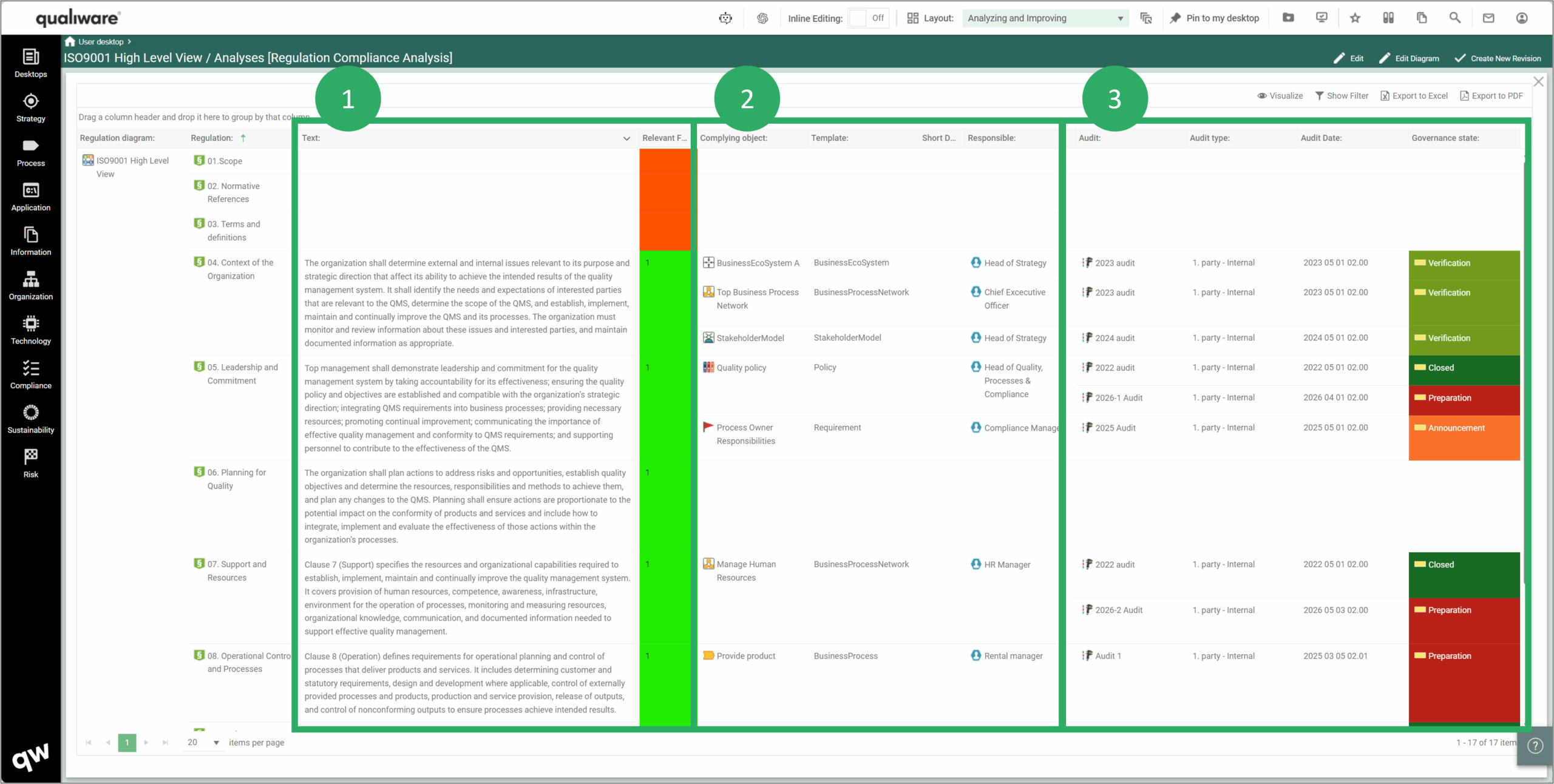
As the Regulation Compliance Matrix this QueryResultView can be used to search the regulation text, and get and overview of:
- what complying objects that are linked to each regulation, and
- who is responsible for each complying object
- if and when the complying object have been part of an audit and the status of the audit
It is easy to filter the list and search in the regulation text to find relevant parts, and from a compliance completeness point of view, you can check:
- that all relevant regulations have relevant complying objects associated (and if not, a gap is identified).
- that all complying objects have a responsible allocated (and if not, a gap is identified).
- that all relevant complying objects has been / will be a part of an audit, if planned audits have been executed, verified and closed, and if the audit are within a reasonable timeframe (audit plan).
Regulation Gap Analysis (QRV)
This QueryResultView takes a step further in the analysis of compliance fulfillment, and focuses on the complying objects and if there are any Gaps (Change Requests) related to the complying objects. Again, with the outset in the regulations in the diagrams the query shows:
- Whether each of the regulations are relevant for business
- Complying object(s) linked to each regulation, the responsible and owner for each complying object.
- All associated Change Requests related to the complying object along with details about the Change Request (ID, Short Description, Responsible) and the Governance State of the Change Request.
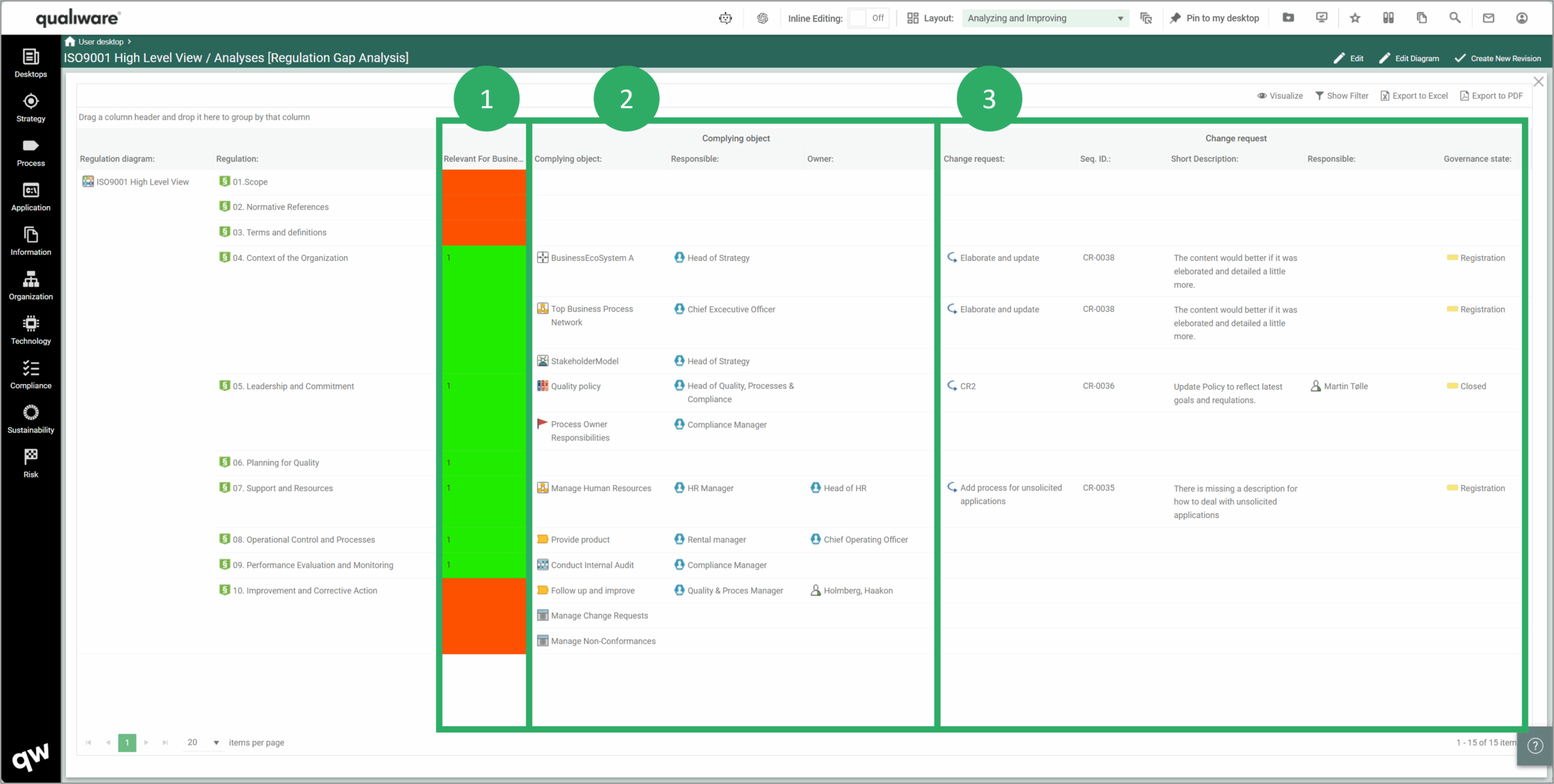
This QueryResultView can be used to get an overview of the status (and gaps) related to the complying objects:
- the focus of this query is to ensure that all change requests are handled, i.e. have responsible and are progressing as planned (and closed before next audit)
A change request can e.g. identified as part of an audit, which are the focus of the previous QRV (Regulation Compliance Analysis)